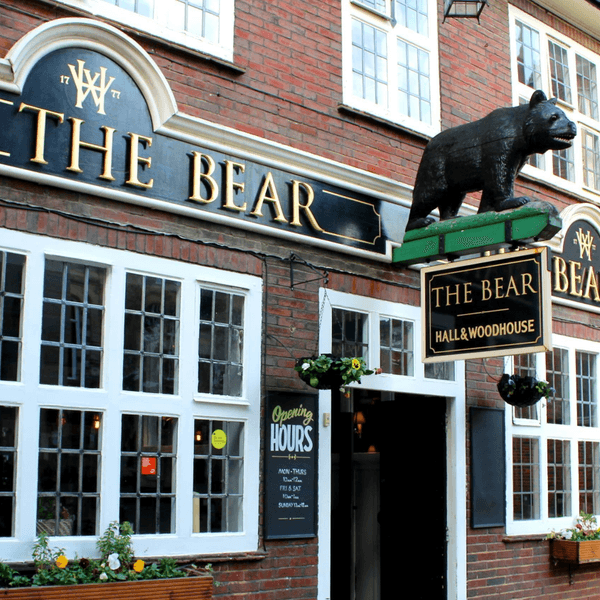
Solo exercise from outside The Bear Horsham RH12 1EU

room 58 ECHOES

Solo exercise, inspired by hash running and walking, so called sash !

The sash idea came about with the corona pandemic, to allow for local exercise, solo or with your bubble, etc. Though with UK rule relaxation, undertake according the present guidelines.

Ground rules, accordingly relaxed: 1) No set date or time. 2) Undertake in groups up to the maximum allowed by guidelines. 3) Keep 2 metres apart from those outside your bubble. 4) Keep 2 metres apart from others if you encounter. 5) Ideally pick sashes that are local to you. 6) Walk bits where you can't clearly see the way ahead, so that 2 metre separation from others can be maintained. 7) In the pub, wear mask according the venue guidelines, or if none, your preference. 8) Mask not recommended while drinking or eating. 9) Do the sash at your own risk.

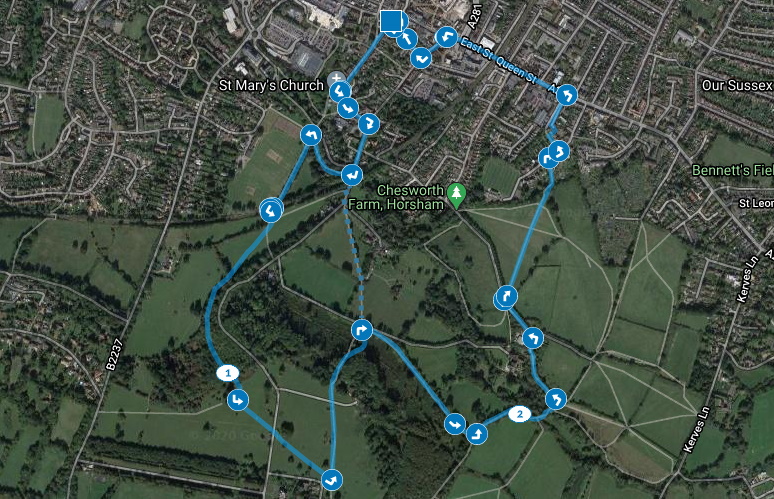
Start from outside The Bear RH12 1EU, marked by the square on the map. Or pickup the trail from outside the Normandy Centre RH12 1JF, where there is parking, marked by the south-most circle on the map.

How it works: Visible on your Apple/Android smartphone or GPS-equipped tablet, referred to here as device, are the following: A start/end square, and four circles showing the initial direction. Your device audibly 'echoes' blobs, checks, etc, when in the vicinity. You can just keep your device in your pocket or backpack, and follow the blob echoes. Or for a check echo, discover which way the blob trail continues. Three blobs in succession, or another check, and you've found the onward trail. A false echo means it's not that way. An echo saying 'on/go left', or 'on/go right', means go that way. Echoes can announce a fair few paces prior to the spot. And echoes repeat every 15 seconds if you linger. For longer stretches, echoes repeat every 15 seconds regardless of where you are within the stretch.

The runners true trail is 3.2 miles, the walkers 2.2 miles. Part-way along the trail, your device echoes that the runners and walkers trails diverge. The trails rejoin enroute.

Along the shared sections, the walkers will encounter the checks, so they'll have a bit more work to do than on a regular hash. Plus one walkers check of their very own. The runners-only part has one 'fish hook' echo, at which participants should return to the last check, then rerun that section.

For runners and walkers, about half-way around, your device echoes 'beer near', then 'beer stop'. For the latter you may like to take some refreshment in your backpack. Nearer the end, your device echoes 'circle up near', then 'circle up', so save some refreshment. After, your device echoes 'inn no', and leads you back to the start/end point.

If you get stuck, a help map is available: Zoom in on the start/end square, then tap the triangle beside, then tap SEE MORE. The blue square is the start/end, the arrows show the trail direction, and the walkers-only part is dotted.

On your device, open the Apple App Store or Android Play Store, and type ‘echoes’ in the store search box. The ECHOES app icon looks a bit like a fingerprint. Install, then open, and sign up. The trail should list under 'near you'. Tap MORE NEAR YOU if not. Possible too, is a tap on the magnifying glass, then type the trail postcode with space, or 'sash' for all. Tap a trail, then tap STREAM WALK to use online copy. Or tap DOWNLOAD or down-arrow symbol for offline copy, then tap START. Swipe down screen to refresh downloaded copy, in case changed online. Sometimes app exit then app restart are needed to fully refresh downloaded copy. Download might get stuck before reaching 100%. In which case, exit app then restart, and tap STREAM WALK instead.

Tips: Like most location apps, ECHOES uses the battery a fair bit. A fully-charged device should be enough for the trail. But you might like to take a powerbank, or spare battery. Plus a paper map as backup.

This info is viewable in a browser at https://explore.echoes.xyz/collections/8n9M30kWyhoAvUl9

Trail last updated 30 July 2021 21:39


Dangleberry
Dangleberry

DOWNLOAD OUR APP TO DISCOVER THIS TOUR AND MANY OTHERS.

play-storeapp-store

The Echoes


Start/End

Blob 1

Blob 2

On Left 1

Check 1

and 46 more echoes…
Discover more geolocated content in our apps.
play-storeapple-app-store

Or start creating tours, treasure hunts, POI maps... Just let your imagination guide you.


Other walks nearby

_DREAMS_

_DREAMS_

_DREAMS_ a dream walk for horsham town centre by clare packham _DREAMS_ was born after discovering my late grandfather had written down his dreams. i started to record my own dreams after waking, and sought to find correlations between our dream worlds. you're about to hear dreams i've had, dreams my dad and grandad have had, and dreams the people of Horsham have had. i'm interested in intergenerational dreaming, and how we dream about people who are no longer with us. _DREAMS_ is accompanied by music composed by my collaborator fintan kealy. after you've experienced the walk, i invite you to come and visit me in 20 west street, as i'd love to hear how it made you feel, & about your own dream world. _DREAMS_ was made possible by hypha studios, who host creatives in empty spaces for free. read about my work with them here: hyphastudios.com/clare-packham THANKS TO: hypha studios fintan kealy maurice packham simon packham felix dickenson talisker horton stan ford rachael mailer the people of horsham
free
A Stroll through Railway History

A Stroll through Railway History

A Stroll through Railway History with Mike Denwood Still to be found along the two mile section of the Downslink path between West Grinstead and Copsale are many artefacts of the old railway line that ran from Shoreham-by-Sea to Itchingfield Junction. Mike Denwood provides a commentary about what to look out for and background information about these artefacts, There is an option, within the walk, top right, to turn off 'Autoplay', then you can control the playback of the audio tracks yourself. With Autoplay 'off' you can play any of the tracks without having to be within the blue area. From this screen you can also see a listing of all of the audio tracks. If you enjoy this audio guide, why not visit Steyning Museum http://www.steyningmuseum.org.uk/museumpage.htm and listen to our guide there? Scripts by Mike Denwood Technical realisation & railway recordings by Nick Quinn avguides@steyningmuseum.org.uk All material, copyright Mike Denwood & Steyning Museum Trust, 2022
free
Solo exercise from outside The Plough Ifield RH11 0NN

Solo exercise from outside The Plough Ifield RH11 0NN

Solo exercise, inspired by hash running and walking, so called sash ! The sash idea came about with the corona pandemic, to allow for local exercise, solo or with your bubble, etc. Though with UK rule relaxation, undertake according the present guidelines. Ground rules, accordingly relaxed: 1) No set date or time. 2) Undertake in groups up to the maximum allowed by guidelines. 3) Keep 2 metres apart from those outside your bubble. 4) Keep 2 metres apart from others if you encounter. 5) Ideally pick sashes that are local to you. 6) Walk bits where you can't clearly see the way ahead, so that 2 metre separation from others can be maintained. 7) In the pub, wear mask according the venue guidelines, or if none, your preference. 8) Mask not recommended while drinking or eating. 9) Do the sash at your own risk. How it works: Visible on your Apple/Android smartphone or GPS-equipped tablet, referred to here as device, are the following: A start/end square, and four circles showing the initial direction. Your device audibly 'echoes' blobs, checks, etc, when in the vicinity. You can just keep your device in your pocket or backpack, and follow the blob echoes. Or for a check echo, discover which way the blob trail continues. Three blobs in succession, or another check, and you've found the onward trail. A false echo means it's not that way. An echo saying 'go left', or 'go right', means go that way. One saying 'on on' means go straight ahead. Echoes can announce a fair few paces prior to the spot. And echoes repeat every 15 seconds if you linger. For longer stretches, echoes repeat every 15 seconds regardless of where you are within the stretch. The runners true trail is 3.5 miles, the walkers 2 miles. Part-way along the trail, your device echoes that the runners and walkers trails diverge. The trails rejoin enroute. Along the shared sections, the walkers will encounter the checks, so they'll have a bit more work to do than on a regular hash. The runners-only part has one 'fish hook' echo, at which participants should return to the last check, then rerun that section. For runners and walkers, about half-way around, your device echoes 'beer near', then 'beer stop'. For the latter you may like to take some refreshment in your backpack. Nearer the end, your device echoes 'circle up near', then 'circle up', so save some refreshment. After, your device leads you back to the start/end point. Ifield, derived from 'Yew-field', receives mention in the Domesday Book, where it is recorded as 'Ifelt', by a scribe perhaps with other things on his mind. The scribe didn't really sell it, with the entry 'it is and was worth 20 shillings', though this was before the invention of the estate agent. If you get stuck, a help map is available: Zoom in on the start/end square, then tap the triangle beside, then tap SEE MORE. The blue square is the start/end, the arrows show the trail direction, and the walkers-only part is dotted. On your device, open the Apple App Store or Android Play Store, and type ‘echoes’ in the store search box. The ECHOES app icon looks a bit like a fingerprint. Install, then open, and sign up. The trail should list under 'near you'. Tap MORE NEAR YOU if not. Possible too, is a tap on the magnifying glass, then type the trail postcode with space, or 'sash' for all. Tap a trail, then tap STREAM WALK to use online copy. Or tap DOWNLOAD or down-arrow symbol for offline copy, then tap START. Swipe down screen to refresh downloaded copy, in case changed online. Sometimes app exit then app restart are needed to fully refresh downloaded copy. Download might get stuck before reaching 100%. In which case, exit app then restart, and tap STREAM WALK instead. Tips: Like most location apps, ECHOES uses the battery a fair bit. A fully-charged device should be enough for the trail. But you might like to take a powerbank, or spare battery. Plus a paper map as backup. This info is viewable in a browser at https://explore.echoes.xyz/collections/J7yETNXuZw0lGJ9M Trail last updated 30 July 2021 21:43
free
Solo exercise from outside The White Hart Henfield BN5 9HP

Solo exercise from outside The White Hart Henfield BN5 9HP

Solo exercise, inspired by hash running and walking, so called sash ! The sash idea came about with the corona pandemic, to allow for local exercise, solo or with your bubble, etc. Though with UK rule relaxation, undertake according the present guidelines. Ground rules, accordingly relaxed: 1) No set date or time. 2) Undertake in groups up to the maximum allowed by guidelines. 3) Keep 2 metres apart from those outside your bubble. 4) Keep 2 metres apart from others if you encounter. 5) Ideally pick sashes that are local to you. 6) Walk bits where you can't clearly see the way ahead, so that 2 metre separation from others can be maintained. 7) In the pub, wear mask according the venue guidelines, or if none, your preference. 8) Mask not recommended while drinking or eating. 9) Do the sash at your own risk. How it works: Visible on your Apple/Android smartphone or GPS-equipped tablet, referred to here as device, are the following: A start/end square, and four circles showing the initial direction. Your device audibly 'echoes' blobs, checks, etc, when in the vicinity. You can just keep your device in your pocket or backpack, and follow the blob echoes. Or for a check echo, discover which way the blob trail continues. Three blobs in succession, or another check, and you've found the onward trail. A false echo means it's not that way. An echo saying 'on left', or 'on right', means go that way. Echoes can announce a fair few paces prior to the spot. And echoes repeat every minute if you linger. The runners true trail is 4 miles, the walkers 2.9 miles. Part-way along the trail, your device echoes that the runners and walkers trails diverge. They rejoin later. The runners trail has one 'fish hook' echo, at which you should return to the last check, then rerun that section. Toward the end, your device echoes 'beer near', then 'beer stop'. For the latter you may like to take some refreshment in your backpack. Nearer the end, your device echoes 'inn no', and leads you back to the start/end point. If you get stuck, a help map is available: Zoom in on the start/end square, then tap the triangle beside, then tap SEE MORE. The blue square is the start/end, the arrows show the trail direction, and the walkers-only part is dotted. On your device, open the Apple App Store or Android Play Store, and type ‘echoes’ in the store search box. The ECHOES app icon looks a bit like a fingerprint. Install, then open, and sign up. The trail should list under 'near you'. Tap MORE NEAR YOU if not. Possible too, is a tap on the magnifying glass, then type the trail postcode with space, or 'sash' for all. Tap a trail, then tap STREAM WALK to use online copy. Or tap DOWNLOAD or down-arrow symbol for offline copy, then tap START. Swipe down screen to refresh downloaded copy, in case changed online. Sometimes app exit then app restart are needed to fully refresh downloaded copy. Download might get stuck before reaching 100%. In which case, exit app then restart, and tap STREAM WALK instead. Tips: Like most location apps, ECHOES uses the battery a fair bit. A fully-charged device should be enough for the trail. But you might like to take a powerbank, or spare battery. Plus a paper map as backup. This info is viewable in a browser at https://explore.echoes.xyz/collections/SLKktTDzWikoTJKv Trail last updated 30 July 2021 21:35
free
P3-Pressurized

P3-Pressurized

A look into how I feel when traveling by plane and a basic showcase of field recordings and music blending together to create an immersive experience.
free
Graveyard Gossip

Graveyard Gossip

An audio guide to some of the intriguing graves to be found in the parish churchyard of St. Andrew & St. Cuthman, Steyning. All of the audio is available from or near the edge of a path, or over good ground. If you do have a closer look at a grave please be very careful and wary of hidden stones and hollows. When you walk into a blue area the audio is triggered. It will play through until the end so if you walk into another blue area that audio will also play! If you end up with two or more tracks playing then you should 'stop' the walk, move outside a blue area and 'start' again. By tapping on one of the small circles and then 'more', you can see an image of the gravestone. There is an option, within the walk, top right, to turn off 'Autoplay', then you can control the playback of the audio tracks yourself. With Autoplay 'off' you can play any of the tracks without having to be within the blue area. From this screen you can also see all of the audio tracks listed. If you enjoy this audio guide, why not visit Steyning Museum http://www.steyningmuseum.org.uk/museumpage.htm and listen to our guide there? Scripts by Lois Roemer Technical realisation by Nick Quinn avguides@steyningmuseum.org.uk All material, copyright Steyning Museum Trust, 2022
free
Solo exercise from outside The Stand Up Inn Lindfield RH16 2HN

Solo exercise from outside The Stand Up Inn Lindfield RH16 2HN

Solo exercise, inspired by hash running and walking, so called sash ! The sash idea came about with the corona pandemic, to allow for local exercise, solo or with your bubble, etc. Though with UK rule relaxation, undertake according the present guidelines. Ground rules, accordingly relaxed: 1) No set date or time. 2) Undertake in groups up to the maximum allowed by guidelines. 3) Keep 2 metres apart from those outside your bubble. 4) Keep 2 metres apart from others if you encounter. 5) Ideally pick sashes that are local to you. 6) Walk bits where you can't clearly see the way ahead, so that 2 metre separation from others can be maintained. 7) In the pub, wear mask according the venue guidelines, or if none, your preference. 8) Mask not recommended while drinking or eating. 9) Do the sash at your own risk. How it works: Visible on your Apple/Android smartphone or GPS-equipped tablet, referred to here as device, are the following: A start/end square, and four circles showing the initial direction. Your device audibly 'echoes' blobs, checks, etc, when in the vicinity. You can just keep your device in your pocket or backpack, and follow the blob echoes. Or for a check echo, discover which way the blob trail continues. Three blobs in succession, or another check, and you've found the onward trail. A false echo means it's not that way. An echo saying 'on left', or 'on right', means go that way. Echoes can announce a fair few paces prior to the spot. And echoes repeat every minute if you linger. The runners true trail is 4 miles, the walkers 3.2 miles. Part-way along the trail, your device echoes that the runners and walkers trails diverge. They rejoin later. The runners trail has one 'fish hook' echo, at which you should return to the last check, then rerun that section. Toward the end, your device echoes 'beer near', then 'beer stop'. For the latter you may like to take some refreshment in your backpack. Nearer the end, your device echoes 'inn no', and leads you back to the start/end point. If you get stuck, a help map is available: Zoom in on the start/end square, then tap the triangle beside, then tap SEE MORE. The blue square is the start/end, the arrows show the trail direction, and the walkers-only part is dotted. Use of the watercolour for this sash by kind permission of Lindfield-based Brett Hudson Art https://www.facebook.com/bretthudsonart/ On your device, open the Apple App Store or Android Play Store, and type ‘echoes’ in the store search box. The ECHOES app icon looks a bit like a fingerprint. Install, then open, and sign up. The trail should list under 'near you'. Tap MORE NEAR YOU if not. Possible too, is a tap on the magnifying glass, then type the trail postcode with space, or 'sash' for all. Tap a trail, then tap STREAM WALK to use online copy. Or tap DOWNLOAD or down-arrow symbol for offline copy, then tap START. Swipe down screen to refresh downloaded copy, in case changed online. Sometimes app exit then app restart are needed to fully refresh downloaded copy. Download might get stuck before reaching 100%. In which case, exit app then restart, and tap STREAM WALK instead. Tips: Like most location apps, ECHOES uses the battery a fair bit. A fully-charged device should be enough for the trail. But you might like to take a powerbank, or spare battery. Plus a paper map as backup. This info is viewable in a browser at https://explore.echoes.xyz/collections/EizvOr1bgzaKttPN Trail last updated 30 July 2021 21:36
free
The Steyning Line - The Lost Railway

The Steyning Line - The Lost Railway

Welcome to The Steyning Line - The Lost Railway. We hope you enjoy your journey back in time as you listen to those that worked and rode the line. We hope that this introduction to the line will encourage you to learn more about its history and that of the towns and villages that connected with the line. Warm Regards The Steyning and District Community Partnership. 1932 Bramber Station map: Reproduced with the permission of the National Library of Scotland under the terms of the Creative Commons Attribution (CC-BY) licence. Audio extracts courtesy of Philip Gardner and The Steyning Museum Trust.
free
Solo exercise from outside The Plough Pyecombe BN45 7FN

Solo exercise from outside The Plough Pyecombe BN45 7FN

Solo exercise, inspired by hash running and walking, so called sash ! The sash idea came about with the corona pandemic, to allow for local exercise, solo or with your bubble, etc. Though with UK rule relaxation, undertake according the present guidelines. Ground rules, accordingly relaxed: 1) No set date or time. 2) Undertake in groups up to the maximum allowed by guidelines. 3) Keep 2 metres apart from those outside your bubble. 4) Keep 2 metres apart from others if you encounter. 5) Ideally pick sashes that are local to you. 6) Walk bits where you can't clearly see the way ahead, so that 2 metre separation from others can be maintained. 7) In the pub, wear mask according the venue guidelines, or if none, your preference. 8) Mask not recommended while drinking or eating. 9) Do the sash at your own risk. How it works: Visible on your Apple/Android smartphone or GPS-equipped tablet, referred to here as device, are the following: A start/end square, and four circles showing the initial direction. Your device audibly 'echoes' blobs, checks, etc, when in the vicinity. You can just keep your device in your pocket or backpack, and follow the blob echoes. Or for a check echo, discover which way the blob trail continues. Three blobs in succession, or another check, and you've found the onward trail. A false echo means it's not that way. An echo saying 'on left', or 'on right', means go that way. Echoes can announce a fair few paces prior to the spot. Echoes repeat every minute if you linger. The runners true trail is 3.5 miles, the walkers 2 miles. Part-way along the trail, your device echoes that the runners and walkers trails diverge. They rejoin later. The runners trail has one 'fish hook' echo, at which you should return to the last check, then rerun that section. Toward the end, your device echoes 'beer near', then 'beer stop'. For the latter you may like to take some refreshment in your backpack. Nearer the end, your device echoes 'inn no', and leads you back to the start/end point. If you get stuck, a help map is available: Zoom in on the start/end square, then tap the triangle beside, then tap SEE MORE. The blue square is the start/end, the arrows show the trail direction, and the walkers-only part is dotted. On your device, open the Apple App Store or Android Play Store, and type ‘echoes’ in the store search box. The ECHOES app icon looks a bit like a fingerprint. Install, then open, and sign up. The trail should list under 'near you'. Tap MORE NEAR YOU if not. Possible too, is a tap on the magnifying glass, then type the trail postcode with space, or 'sash' for all. Tap a trail, then tap STREAM WALK to use online copy. Or tap DOWNLOAD or down-arrow symbol for offline copy, then tap START. Swipe down screen to refresh downloaded copy, in case changed online. Sometimes app exit then app restart are needed to fully refresh downloaded copy. Download might get stuck before reaching 100%. In which case, exit app then restart, and tap STREAM WALK instead. Tips: Like most location apps, ECHOES uses the battery a fair bit. A fully-charged device should be enough for the trail. But you might like to take a powerbank, or spare battery. Plus a paper map as backup. This info is viewable in a browser at https://explore.echoes.xyz/collections/mYxjWERBOhREyH3g Trail last updated 30 July 2021 21:35
free

Are you a creator?

START HERE

Privacy & cookie policy / Terms and conditions

© ECHOES. All rights reserved / ECHOES.XYZ Limited is a company registered in England and Wales, Registered office at Merston Common Cottage, Merston, Chichester, West Sussex, PO20 1BE

v2.4.30 © ECHOES. All rights reserved.